Integrated Inventory Software
Managing inventory efficiently is one of the biggest challenges for businesses today. Whether you operate a wholesale business, retail shop, distribution company, or manufacturing unit, maintaining accurate stock records is essential for profitability and customer satisfaction.
Traditional inventory management methods, such as spreadsheets and separate accounting systems, can lead to stock mismatches, data duplication, delayed reporting, and errors in business transactions.
Integrated inventory software helps solve these problems by connecting inventory management with accounting, sales, purchasing, and other business operations through a single system.
In this blog, we will explore the best features of integrated inventory software and explain how these features can improve business efficiency, reduce costs, and support better decision-making.
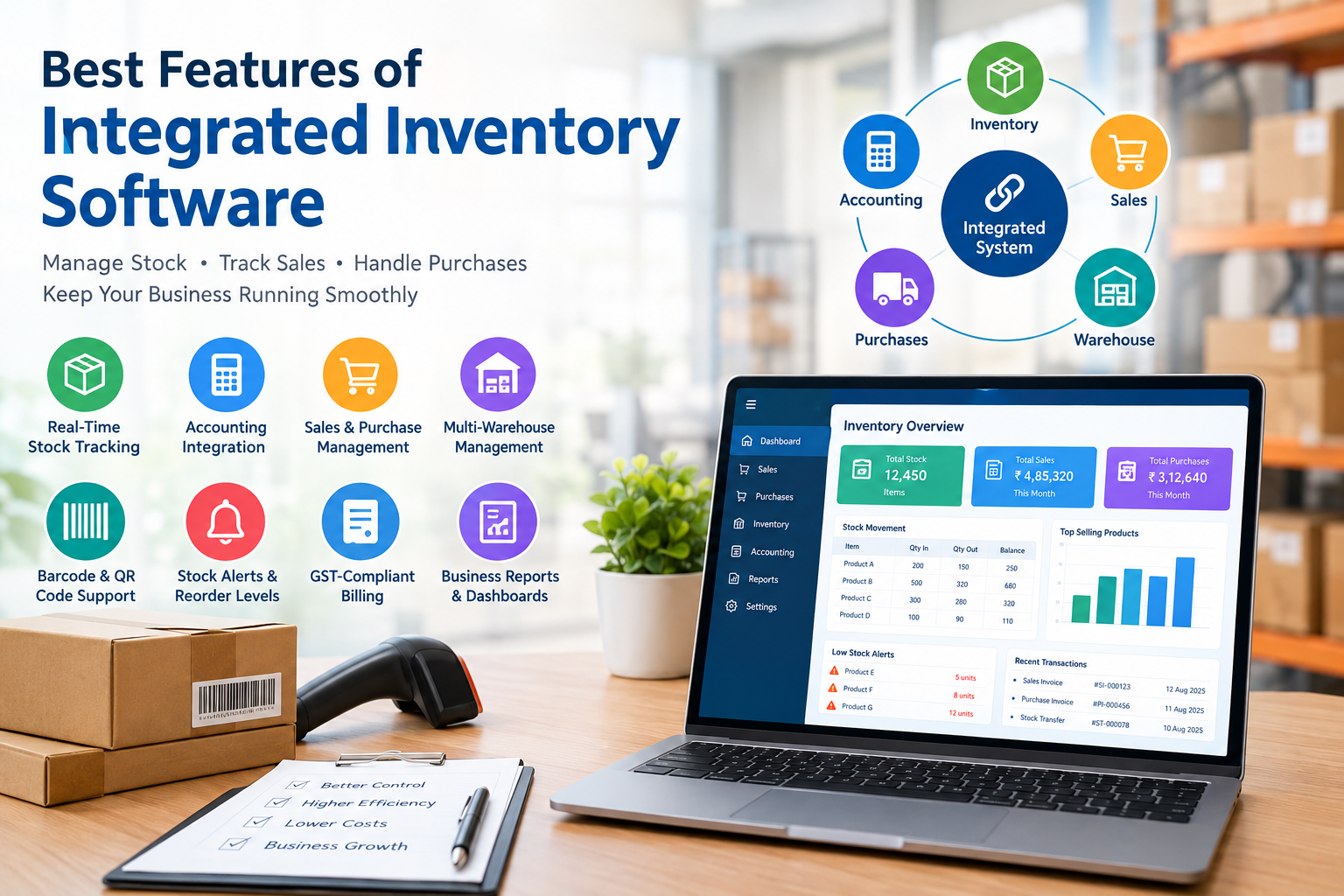
Real-Time Inventory Tracking
Real-time inventory tracking is one of the most important features of integrated inventory software.
Whenever a business purchases, sells, transfers, or returns goods, the system automatically updates the stock balance.
Key benefits include:
- Know the available stock of every product at any time.
- Reduce differences between physical stock and system records.
- Identify fast-moving and slow-moving products.
- Avoid unnecessary purchases and excess inventory.
- Make better purchasing decisions using accurate stock information.
With real-time stock visibility, business owners can manage inventory more confidently.
Integration with Accounting Software
Inventory management becomes more powerful when it is directly connected to accounting.
In an integrated system, sales, purchases, stock movements, and other relevant transactions can automatically update the corresponding accounting records according to the configured rules.
Important capabilities include:
- Automatic posting of sales and purchase transactions.
- Integration with customer and supplier accounts.
- Stock valuation and inventory-related accounting entries.
- Tracking outstanding receivables and payables.
- Generating profit and loss statements and balance sheets.
- Reducing duplicate data entry.
This integration saves time and helps maintain consistency between stock records and financial accounts.
Sales and Purchase Management
An integrated inventory system should manage the complete sales and purchase process, from order creation to final transaction recording.
Sales management
- Sales quotations and sales orders.
- Sales invoices and delivery documentation.
- Customer-specific pricing and discounts.
- Sales returns and credit notes.
- Customer outstanding reports.
- Salesperson-wise and product-wise sales analysis.
Purchase management
- Purchase requests and purchase orders.
- Goods receipt and supplier invoices.
- Supplier pricing and purchase history.
- Purchase returns and debit notes.
- Supplier outstanding reports.
- Pending order and expected delivery tracking.
Connecting these activities with inventory ensures that stock availability, order status, and financial information remain consistent.
Multi-Warehouse and Multiple Location Management
Businesses operating from different branches, warehouses, or storage locations need accurate location-wise stock information.
Integrated inventory software should support:
- Separate stock balances for each warehouse.
- Inter-warehouse stock transfers.
- Location-wise stock valuation.
- Warehouse-wise sales and purchase reports.
- Stock-in-transit tracking where applicable.
- Consolidated inventory reporting across branches.
For distributors, wholesalers, and multi-branch retailers, these features improve stock visibility and simplify inventory control.
Barcode and QR Code Support
Barcode-enabled inventory management can make stock handling faster and more accurate.
Instead of manually searching for products or entering item codes, employees can scan barcodes during routine transactions.
Useful features include:
- Barcode generation and printing.
- Barcode-based product identification.
- Faster sales billing.
- Stock receiving and dispatch scanning.
- Physical stock verification using scanners.
- Support for compatible barcode printers and scanners.
This feature is particularly useful for retail shops, supermarkets, warehouses, and distribution businesses with large product ranges.
Reorder Levels and Automatic Stock Alerts
Running out of essential products can result in lost sales, while purchasing too much stock can block working capital.
Integrated inventory software helps businesses maintain suitable stock levels.
The system should provide:
- Minimum and maximum stock levels.
- Reorder-level alerts.
- Low-stock notifications.
- Suggested purchase quantities.
- Identification of excess stock.
- Tracking of pending purchase orders.
Some advanced systems can calculate suggested purchases using sales history, supplier lead times, and demand forecasts.
These features help businesses maintain the right balance between product availability and inventory investment.
Batch, Expiry Date and Serial Number Tracking
Certain products require additional tracking beyond quantity alone.
For example, food products, medicines, cosmetics, electronic equipment, and machinery
parts may need batch, expiry date, or serial number records.
A capable inventory system should support:
- Batch-wise stock management.
- Manufacturing and expiry date tracking.
- First-expiry-first-out (FEFO) stock handling where appropriate.
- Serial number tracking for individual products.
- Warranty information.
- Product traceability and recall support.
These features help businesses improve product control, reduce avoidable losses, and maintain traceable transaction records.
GST-Compliant Billing and Tax Management
For businesses in India, inventory software integrated with accounting should support the relevant GST billing and reporting requirements.
Useful features include:
- GST-enabled sales and purchase invoices.
- HSN or SAC details where applicable.
- Configurable tax rates and tax calculations.
- Intra-state and inter-state transaction handling.
- Credit notes and debit notes.
- GST-related accounting reports.
- Support for e-invoicing and e-way bill workflows where applicable and supported.
Businesses should confirm that their chosen software supports the GST requirements applicable to their operations and transaction types.
Inventory Valuation and Cost Management
Knowing the quantity of stock is not enough. Businesses also need to understand the value and cost of their inventory.
Inventory software should provide appropriate stock valuation methods, such as weighted average or FIFO, depending on the business and accounting requirements.
important capabilities include:
- Stock valuation reports.
- Product-wise cost analysis.
- Purchase cost tracking.
- Landed cost allocation for freight and other eligible costs.
- Inventory adjustment records.
- Identification of obsolete and slow-moving stock.
Accurate inventory valuation supports better financial reporting and helps management understand the real cost of holding stock.
Manufacturing and Bill of Materials (BOM)
Manufacturing businesses require inventory software that can connect raw materials, work-in-progress, and finished goods.
A system with manufacturing capabilities may include:
- Bill of Materials (BOM).
- Raw material requirement planning.
- Production orders.
- Material issue and consumption tracking.
- Finished goods receipt.
- Scrap and wastage recording.
- Production cost calculation.
- Job work and subcontracting support, where required.
By connecting production activities with inventory and accounting, manufacturers can monitor material consumption, production costs, and finished goods availability more effectively.
Customer and Supplier Management
Inventory transactions are closely linked with customers and suppliers. An integrated system should provide a complete view of these relationships.
Key features include:
- Customer and supplier master records.
- Customer-specific price lists.
- Supplier-wise purchase history.
- Credit limits and payment terms.
- Outstanding balances and ageing reports.
- Customer and supplier transaction history.
These capabilities help businesses make informed decisions about credit, purchasing, pricing, and supplier selection.
Business Reports and Dashboards
Business owners need accurate information to make timely decisions. Integrated inventory software should convert transaction data into useful reports.
Important reports include:
- Current stock and stock valuation.
- Product-wise sales and purchases.
- Fast-moving and slow-moving items.
- Stock ageing and non-moving stock.
- Gross profit by product or category.
- Customer-wise and supplier-wise performance.
- Reorder and pending order reports.
- Branch-wise inventory reports.
A dashboard that combines sales, stock, purchasing, and financial indicators can help management identify problems and opportunities quickly.
Cloud Access and Multi-User Support
Businesses increasingly need access to information from different locations.
Cloud-enabled or centrally hosted inventory software can allow authorised users to access business data from supported devices and locations.
Useful features include:
- Access to reports from outside the office.
- Multiple users working on the same business data.
- Role-based permissions.
- Centralised data management.
- Backup and recovery options.
- Access to branch and warehouse information.
Businesses should check the software's security controls, backup policies, hosting arrangements, internet requirements, and user licensing before choosing a solution.
Integration with Other Business Applications
An integrated inventory system should be able to connect with other applications used by the business.
Depending on the software, integrations may include:
- Accounting and ERP modules.
- E-commerce websites.
- Point-of-sale systems.
- CRM applications.
- Payment gateways.
- Shipping and logistics platforms.
- Online marketplaces.
- Business intelligence and reporting tools.
API support and reliable data synchronisation can reduce manual work and make it easier to expand business operations.
User Permissions and Audit Trail
As a business grows, more employees become involved in sales, purchasing, stock
handling, and accounts.
The software should allow management to control what each user can view, create, edit,
approve, or delete.
Important features include:
- Role-based access permissions.
- Transaction approval workflows.
- User activity logs.
- Tracking of changes to important records.
- Controls over stock adjustments and cancellations.
- Separation of responsibilities where appropriate.
These controls improve accountability and help management investigate discrepancies.
Mobile Access and Physical Stock Verification
Mobile-friendly inventory tools can help employees perform stock-related tasks without returning to an office computer.
Depending on the product, mobile features may include:
- Stock enquiries.
- Barcode scanning.
- Goods receipt confirmation.
- Stock transfer requests.
- Physical stock counting.
- Sales order entry.
- Stock adjustment requests.
Before selecting a solution, check whether these functions are available in the mobile application or require additional hardware or subscriptions.
Benefits of Using Integrated Inventory Software
When inventory, accounting, sales, and purchasing work together, businesses can achieve several operational benefits.
Improved accuracy:
Connected transactions reduce repeated data entry and help maintain consistent records.
Reduced operating costs:
Better stock control can reduce wastage, excess purchases, and avoidable inventory losses.
Faster business operations:
Automated updates reduce manual work and simplify routine transactions.
Better customer service:
Accurate stock availability helps employees provide reliable delivery commitments.
Improved cash flow:
Better purchasing decisions can prevent unnecessary money from being tied up in excess stock.
Stronger decision-making:
Timely reports give management a clearer view of profitability, stock movement, and business performance.
Easier business expansion:
Centralised systems can help businesses manage additional products, branches, warehouses, and users.
How to Choose the Right Integrated Inventory Software
Before purchasing inventory software, businesses should evaluate their current requirements and future plans.
Consider the following checklist:
- 1 Does it integrate inventory with accounting automatically?
- 2 Can it manage multiple warehouses and branches?
- 3 Does it support the required GST billing and reporting workflows?
- 4 Can it handle your product types, units, batches, and serial numbers?
- 5 Does it support barcode scanning and physical stock verification?
- 6 Are reorder alerts and stock valuation reports available?
- 7 Can it handle manufacturing or distribution requirements if needed?
- 8 Are user permissions and transaction audit trails available?
- 9 Does it offer reliable backup, security, and support?
- 10 Can it integrate with your existing business applications?
- 11 Is the pricing suitable for your business size and number of users?
- 12 Does the vendor provide implementation, training, and after-sales support?
The best solution is not necessarily the one with the highest number of features. It is the one that fits your business processes, provides accurate information, and can grow with your requirements.
Conclusion
Integrated inventory software is an important tool for businesses that want to improve stock control, simplify accounting, and manage daily operations efficiently.
Features such as real-time inventory tracking, accounting integration, purchase and sales management, warehouse control, barcode support, stock alerts, inventory valuation, and business reporting can help reduce manual work and improve operational visibility.
Whether you run a retail shop, wholesale business, distribution company, or manufacturing unit, choosing the right integrated inventory solution can help you manage resources more effectively and build a stronger foundation for business growth.
Looking for accounting and inventory software for your business?
Shauri Computer Technologies Private Limited helps businesses with accounting software marketing, implementation, training, data migration, and support.
The graphics are amazing and the gameplay is so immersive. I hit a nice win yesterday. Go to 777brasino and try your luck.
Honestly one of the most honest platforms I’ve encountered. Withdrawals are processed without any drama. Big thanks to rwin888!
Simple, clean, and effective. I love that I can get straight to the action without any annoying pop ups. seven777login is the way to go.
The app version is just seamless. Everything is so organized and easy to navigate. I’m really enjoying my time on bd4999betapk.
Installation was a breeze and the app works perfectly. No annoying bugs or crashes during my sessions. Thanks to 3777bdtapk for the great service.